Why Your Gaming Headset Actually Matters
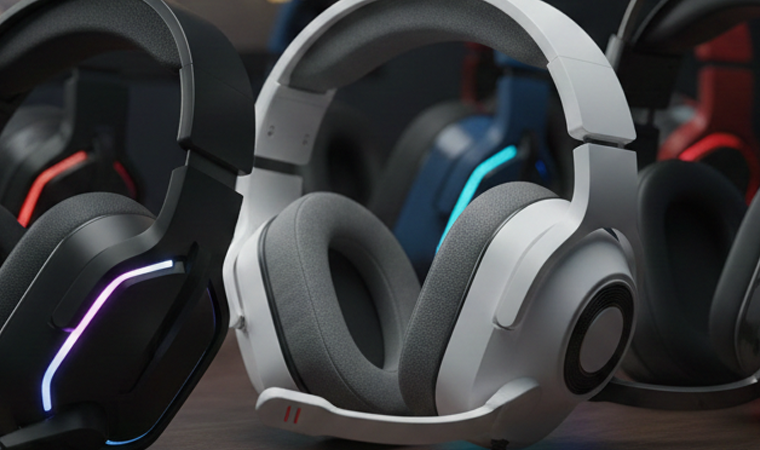
Let’s be real—you can’t hear footsteps with those cheap earbuds that came with your phone. And if you can’t hear where enemies are coming from in competitive games, you’re already at a massive disadvantage. A proper gaming headset isn’t just about having cool RGB lights on your ears (though let’s admit, that’s a nice bonus). It’s about immersion, competitive edge, and not driving your roommates crazy with blasting speakers at 2 AM.
Think of your gaming headset as the bridge between you and the game world. When done right, audio creates atmosphere that visuals alone can’t achieve. The distant rumble of thunder in a horror game. The directional audio cues in a competitive shooter. The soaring orchestral score in an RPG. These experiences demand quality audio, and that’s exactly what a good gaming headset delivers.
But here’s where it gets tricky—the gaming headset market is absolutely flooded with options ranging from $20 garbage to $500+ audiophile equipment. Every brand claims to be “the best gaming headset” with “7.1 surround sound” and “studio-quality audio.” How do you separate marketing hype from actual quality? That’s exactly what this headset buying guide is here to solve.
Audio Can Make or Break Your Experience
Imagine playing a horror game where you can’t hear the monster approaching from behind. Or missing crucial audio cues in a story-driven game because your headset’s frequency response is trash. Bad audio doesn’t just make games less enjoyable—it fundamentally breaks immersion and can ruin experiences that developers spent years crafting.
Good gaming audio creates three-dimensional soundscapes where you can pinpoint exact locations of sounds. It delivers bass that rumbles without distorting. It reproduces dialogue clearly without drowning in effects. When audio works right, you stop noticing it consciously and simply experience the game. That’s the goal.
Competitive Advantage Through Sound
In competitive gaming, audio is information. Footsteps tell you enemy positions. Gunshots reveal distances and directions. Ability sounds indicate what opponents are doing. Pro players will tell you that audio awareness is just as important as visual awareness—sometimes more so.
A quality gaming headset with good positional audio can literally make you a better player. You’ll react faster because you hear threats sooner. You’ll make better tactical decisions because you have more information. This isn’t placebo—it’s measurable advantage that separates good players from great ones.
Understanding Gaming Audio Basics
Stereo vs Surround Sound
Here’s a controversial take: stereo is often better than surround sound for gaming. “But wait,” you’re thinking, “doesn’t 7.1 surround sound mean more channels and better positional audio?” In theory, yes. In practice, most gaming headsets use simulated surround sound through software, not true multi-driver arrays. And honestly? Good stereo imaging often provides better positional accuracy than artificial surround processing.
True stereo uses two drivers (one per ear) and relies on your brain’s natural ability to process directional audio through timing and volume differences. It’s how humans naturally hear. Virtual surround tries to simulate multiple speaker positions through processing, which can make things sound wider but sometimes less precise. For competitive gaming, many pros stick with stereo for this reason.
That said, some games and players prefer surround sound for immersion in single-player experiences. The “best” choice depends on your priorities and the specific implementation. Don’t let “7.1 surround” be the deciding factor—test both if possible.
What Frequency Response Really Means
Frequency response indicates the range of sounds a headset can reproduce, typically listed as something like “20Hz – 20kHz.” Human hearing ranges from about 20Hz (deep bass) to 20kHz (high treble), so that spec looks good on paper. But here’s the secret: nearly every headset can technically reproduce this range. What matters is how accurately and evenly they reproduce it.
A headset might claim 20Hz – 20kHz response but have a massive bass boost that drowns out mid-range frequencies where most game audio lives. Or it might have weak bass that makes explosions sound tinny. The frequency response curve matters more than the raw numbers, but manufacturers rarely publish those curves because they reveal the actual sound signature.
Impedance and Sensitivity Explained Simply
Impedance (measured in ohms) indicates how much power a headset needs to drive properly. Lower impedance (32 ohms or less) works fine with phones, controllers, and consoles. Higher impedance (80+ ohms) often requires dedicated amplifiers to reach proper volume without distortion.
For gaming headsets, you generally want lower impedance unless you’re specifically getting audiophile headphones and plan to use an amp. Most gaming headsets are designed around 32 ohms specifically to work across all platforms without additional equipment.
Sensitivity (measured in dB/mW) indicates how loud a headset gets with a given power input. Higher sensitivity means louder maximum volume. For gaming, aim for sensitivity around 100-110 dB/mW—enough to get loud without being dangerous, and efficient enough to not drain controller or console batteries quickly.
Types of Gaming Headsets
Wired vs Wireless Gaming Headsets
Latency Considerations
Wired headsets have zero latency—audio arrives instantly. Wireless introduces some delay, though modern 2.4GHz wireless gaming headsets have minimized this to imperceptible levels (often under 20ms). Bluetooth typically has higher latency (100-200ms+), making it unsuitable for competitive gaming where timing matters.
For casual gaming, wireless latency is rarely noticeable. For competitive play in rhythm games or shooters where milliseconds matter, wired still has the edge. But honestly? Modern wireless gaming headsets from reputable brands have closed the gap to the point where most players won’t notice the difference.
Battery Life vs Unlimited Power
Wired headsets never die—plug them in and they work indefinitely. Wireless headsets require charging, typically lasting 15-30 hours per charge for modern models. This becomes a consideration: do you want the freedom of wireless, or the peace of mind knowing your headset will never die mid-game?
Battery anxiety is real. There’s nothing worse than your headset dying during a crucial moment because you forgot to charge it. That said, most wireless headsets can be used wired while charging, giving you the best of both worlds—wireless when charged, wired as backup.
Open-Back vs Closed-Back Design
Closed-back headsets seal around your ears, isolating external noise and preventing sound from leaking out. They’re the standard for gaming—especially important if you play in shared spaces or need to focus without distractions. The bass response is typically stronger, and the isolation helps with immersion.
Open-back headsets have perforated ear cups that allow air and sound to pass through. They sound more natural and spacious (better soundstage), but they leak sound dramatically and provide no isolation. These are for quiet environments where you’re alone and want the most accurate audio reproduction. Most gamers prefer closed-back for practical reasons, though audiophiles often champion open-back for sound quality.
On-Ear, Over-Ear, and In-Ear Options
Over-ear (circumaural) headsets surround your entire ear, providing the best comfort and sound quality for extended gaming. The large ear cups accommodate bigger drivers for better audio, and the full enclosure provides isolation. This is the standard for gaming headsets.
On-ear (supra-aural) headsets sit on your ears rather than around them. They’re more portable and lighter but less comfortable for long sessions and provide less isolation. Less common in gaming.
In-ear gaming earbuds are the minority but growing in popularity for mobile gaming and situations where full headsets are impractical. They’re portable and can sound excellent (think high-end IEMs), but they lack the immersive soundstage of full-size headsets and rarely include good microphones.
Key Features to Look For
Microphone Quality
Boom Mics vs Built-In Mics
Boom microphones—the ones that extend on an arm from the headset—are vastly superior to built-in mics. They position closer to your mouth for clearer voice capture, reduce background noise pickup, and often include pop filters to minimize plosive sounds (those harsh P and B sounds).
Built-in mics (hidden in the ear cup) are fine for casual voice chat but rarely match boom mic quality. They pick up more ambient noise, position further from your mouth requiring higher gain (which increases noise), and lack physical controls like flip-to-mute that boom mics often feature.
For serious multiplayer gaming, a detachable or retractable boom mic is worth prioritizing. Your teammates will thank you for clear communications rather than muffled garbage audio.
Noise Cancellation Technology
Microphone noise cancellation (different from headphone noise cancellation) filters background sounds from your voice transmission. It reduces keyboard clacking, mouse clicking, environmental noise, and other people talking in the background—only transmitting your voice clearly.
This feature ranges from basic to sophisticated. Budget headsets might have simple noise gates that cut audio below a certain volume threshold. Premium headsets use AI-powered noise suppression that actively identifies and removes specific background sounds while preserving voice quality. The difference is dramatic if you game in noisy environments.
Comfort for Long Gaming Sessions
You can have the best-sounding gaming headset in the world, but if it hurts after an hour, you won’t use it. Comfort is subjective but crucial. Look for: adequate headband padding that distributes weight evenly, ear cups deep enough that your ears don’t touch the drivers, breathable materials that don’t make your ears sweat, and adjustability to fit your specific head shape.
The “clamping force”—how tightly the headset grips your head—needs balancing. Too loose and it slides around; too tight and it causes headaches. Most headsets loosen slightly with use, so some initial tightness is normal. But if a headset is painfully tight in the store, it’s not going to magically become comfortable at home.
Build Quality and Durability
Gaming headsets take abuse—they’re adjusted constantly, tossed on desks, tangled in chair wheels, and generally treated rougher than audiophile equipment. Build quality matters for longevity. Look for metal headbands (or reinforced plastic), braided cables that resist tangling and breaking, reinforced stress points where parts connect, and swappable ear pads for when the originals wear out.
Some brands are notorious for fragile builds (looking at you, certain popular RGB-heavy brands). Others build tanks that last for years. Check long-term reviews focusing on durability, not just initial impressions.
Platform Compatibility
Not all gaming headsets work on all platforms. Some are PC-only. Some work on PlayStation but not Xbox (or vice versa). Some require specific adapters for older consoles. Before buying, verify compatibility with your specific gaming setup.
The safest bet is a 3.5mm wired headset—these work universally across PC, all current consoles, mobile devices, and most other audio sources. USB headsets work on PC and PlayStation but not Xbox. Wireless adds another layer of complexity with different protocols for different platforms.
Best Gaming Headset by Budget
Budget Gaming Headsets Under $50
Budget doesn’t mean garbage anymore. The HyperX Cloud Stinger ($40-50) delivers solid sound and comfort. The Corsair HS35 ($35-45) provides decent audio and a surprisingly good mic. The Razer Kraken X ($40) offers Razer’s signature bass-heavy sound on a budget. The SteelSeries Arctis 1 ($50) is the most versatile with wireless and multi-platform support.
Expectations at this price: acceptable sound quality, decent comfort for 2-3 hour sessions, functional microphones, and plastic builds that feel cheap but work. You’re making compromises, but these headsets get the job done for casual gaming without destroying your wallet.
Mid-Range Options ($50-$150)
This is the sweet spot where quality dramatically improves. The HyperX Cloud Alpha ($80-100) is the perennial favorite with excellent sound and comfort. The SteelSeries Arctis 7 ($150) offers quality wireless. The Logitech G Pro X ($100-130) provides studio-quality audio and swappable ear pads. The Razer BlackShark V2 ($100) delivers THX spatial audio and exceptional comfort.
At this price point, expect: genuinely good audio quality competitive with entry-level audiophile headphones, comfortable designs for all-day gaming, quality boom mics, durable builds with metal components, and platform flexibility. This range offers the most value—big improvements over budget options without the diminishing returns of premium pricing.
Premium Headsets ($150-$300)
Premium territory brings refinement and wireless options. The SteelSeries Arctis Nova Pro ($350) offers active noise cancellation and swappable batteries. The Audeze Maxwell ($300) provides planar magnetic drivers for audiophile sound quality. The Astro A50 ($300) is the wireless standard for console gaming. The SennheiserGame One ($200-250) brings Sennheiser’s audio expertise to gaming.
Benefits over mid-range: premium materials and comfort, audiophile-grade sound quality, advanced wireless with low latency, longer battery life, premium microphones approaching standalone quality, and additional features like ANC, swappable batteries, or comprehensive software control.
Audiophile-Grade Gaming Audio ($300+)
At this level, you’re getting studio monitoring headphones repurposed for gaming. The Audeze LCD-GX ($900) offers planar magnetic technology. The Beyerdynamic MMX 300 ($350-450) provides studio reference sound. The Focal Clear ($1400—okay, this is absurd) is for people with more money than sense who want the absolute best.
Realistically, most gamers don’t need this tier. The improvements over $150-300 headsets are subtle and often require high-end equipment (DACs/amps) and trained ears to appreciate. This is for audiophile gamers who care deeply about sound quality and want no compromises.
Gaming Headset Buying Guide by Platform
Best Headsets for PC Gaming
PC gaming offers maximum flexibility—USB, 3.5mm, wireless with dongles, Bluetooth—everything works. This makes PC the best platform for headset choice. Top picks: HyperX Cloud Alpha (wired value), SteelSeries Arctis Nova 7 (wireless all-around), Logitech G Pro X (competitive gaming), Audeze Maxwell (if budget allows).
PC gamers can also use studio headphones with separate microphones (ModMic, Antlion) for superior audio quality. This approach separates concerns—get the best headphones for sound, add a quality mic, end up with better overall results than combo gaming headsets at similar prices.
Console Gaming Headsets (PS5, Xbox)
Console compatibility varies. PlayStation supports USB and 3.5mm. Xbox primarily uses 3.5mm unless you get Xbox Wireless certified headsets. The best universal console options: SteelSeries Arctis 7 (works on everything), Astro A50 (console-focused wireless), Turtle Beach Stealth 700 (Xbox specific), Sony Pulse 3D (PlayStation specific but works elsewhere via 3.5mm).
Console gamers should prioritize 3.5mm wired connections for maximum compatibility, or verify specific wireless compatibility before purchasing.
Nintendo Switch Compatible Options
The Switch has limited audio options—3.5mm while docked or handheld, Bluetooth for handheld only (with lag). Any 3.5mm headset works, making this the easiest platform. Wireless options are limited to Bluetooth (not ideal for gaming due to latency) or USB dongles while docked.
Best Switch options: any comfortable 3.5mm wired headset, or SteelSeries Arctis 1 which includes a USB-C wireless dongle that works directly with Switch.
Multi-Platform Headsets
Looking for one headset for everything? The SteelSeries Arctis Nova 7 works on PC, PlayStation, Switch, and mobile. The HyperX Cloud Alpha works wired on everything. The Audeze Maxwell supports multiple simultaneous wireless connections.
Multi-platform headsets sacrifice some optimization for versatility. They work everywhere competently rather than being perfect for one specific platform.
Wireless Technology Explained
Bluetooth vs Proprietary Wireless
Bluetooth is convenient—it works with nearly every device. The problem is latency. Standard Bluetooth has 100-200ms delay, making it unsuitable for gaming where audio-visual sync matters. Some newer codecs (aptX Low Latency, LC3) reduce this, but compatibility varies.
Proprietary 2.4GHz wireless (what gaming headsets use) delivers 15-30ms latency—imperceptible for most people. It requires a USB dongle but provides gaming-appropriate performance. If you want truly wireless gaming, get a headset with proprietary wireless, not Bluetooth-only options.
2.4GHz Dongles and Low Latency
Gaming-focused wireless headsets use 2.4GHz dongles that establish direct connections between headset and dongle. This bypasses Bluetooth’s limitations, achieving low latency and stable connections. The dongles are usually plug-and-play, requiring no setup—just plug in and they work.
Some premium headsets support simultaneous wireless and Bluetooth connections, letting you connect to your PC via dongle (for gaming audio) while also connecting to your phone via Bluetooth (for voice chat or music). This flexibility is incredibly convenient.
Battery Life Expectations
Modern wireless gaming headsets typically last 15-30 hours per charge. The SteelSeries Arctis Nova 7 manages 38 hours. The Razer BlackShark V2 Pro lasts 24 hours. The Logitech G733 provides 29 hours.
Battery life below 15 hours is disappointing in 2026—charging every day or two becomes annoying. Look for 20+ hour battery life for comfortable usage patterns where you charge once or twice weekly rather than constantly.
Sound Profiles and EQ Settings
Gaming-Focused Audio Tuning
Gaming headsets often boost bass for explosions and treble for footsteps while slightly recessing midrange. This creates an exciting, effect-heavy sound signature ideal for action games but not accurate to how the audio was mastered. Some gamers love this; others prefer neutral sound.
The “best” tuning depends on game genre. Competitive shooters benefit from emphasized treble (footsteps, reloads, ability sounds). RPGs and adventure games sound better with balanced signatures emphasizing midrange for dialogue and music. Experiment with presets if your headset offers them.
Music and Media Performance
Many gamers also use headsets for music and movies. Gaming-tuned sound doesn’t always translate well—the exaggerated bass and treble that work for games can make music sound unnatural. Ideally, find a headset that sounds good for both, or use EQ software to create separate profiles for gaming versus media consumption.
Headsets from audio-specialist brands (Sennheiser, Audio-Technica, Beyerdynamic) typically sound better for music while still working great for games. They prioritize accuracy over gaming-specific tuning.
Software and Customization
Many gaming headsets include companion software (Razer Synapse, Logitech G Hub, SteelSeries GG) providing EQ customization, surround sound options, mic monitoring, and presets. This software adds value if implemented well but can be buggy and resource-intensive.
The best implementations allow per-game profiles that automatically switch audio settings based on what you’re playing. The worst implementations crash, conflict with other software, and provide minimal actual benefit. Check reviews specifically mentioning software quality before relying on these features as selling points.
Comfort Features That Matter
Headband Padding and Adjustment
Headband design dramatically affects comfort. The best implementations use suspended headbands (SteelSeries Arctis series) that self-adjust and distribute weight evenly. Traditional padded headbands work if there’s sufficient cushioning and adjustment range.
Poor headband design creates pressure points on the top of your head, causing headaches during extended sessions. Test this specifically—put the headset on and notice where pressure concentrates. Some pressure is normal, but sharp pressure points or hotspots indicate poor design.
Ear Cup Materials and Breathability
Ear cup materials affect comfort and heat. Velour fabric pads breathe better than leather or leatherette, making them ideal for long sessions or warm environments. Leather/leatherette pads seal better for isolation and typically last longer but trap heat.
Memory foam padding conforms to your head shape, improving comfort over time. Cheaper foam loses its shape quickly, leading to discomfort as pads compress permanently. Replaceable ear pads extend headset life—when pads wear out (they all eventually do), you can buy new pads rather than new headsets.
Weight and Pressure Distribution
Lighter isn’t always better—weight distribution matters more. A 300g headset with excellent weight distribution feels lighter than a 250g headset that’s poorly balanced. Over-ear designs distribute weight around your ears; on-ear designs concentrate pressure on ear cartilage (less comfortable).
Try before you buy if possible. Wear the headset for 10-15 minutes minimum in the store. Initial comfort doesn’t always predict long-term comfort, but obvious discomfort in the first minutes definitely indicates problems.
Glasses-Friendly Designs
Glasses wearers know the pain of headsets pressing frames into the sides of your head. Glasses-friendly headsets use softer ear pads with enough depth that the pads seal around glasses arms rather than crushing them against your head.
Some headsets include “glasses relief channels”—indentations in the padding where glasses arms sit. The HyperX Cloud series, SteelSeries Arctis series, and Razer BlackShark V2 are all explicitly designed with glasses wearers in mind.
Brand Comparison
SteelSeries vs HyperX
SteelSeries focuses on comfort (ski goggle headband design), premium materials, and extensive software customization. They tend toward more expensive options but with refinement justifying the price. The Arctis series has become an industry standard.
HyperX prioritizes value, durability, and comfort at lower price points. Their Cloud series offers excellent sound and comfort for the money with minimal gimmicks. They’re the “safe choice”—rarely the best at anything specific, but consistently good at everything.
Choose SteelSeries for premium features and comfort. Choose HyperX for value and reliability.
Razer vs Logitech
Razer emphasizes aesthetics (RGB everything), bass-heavy sound signatures, and ecosystem integration for people already using Razer keyboards/mice. Build quality is sometimes questionable but improving. They create excitement through aggressive design.
Logitech focuses on engineering refinement, software integration (G Hub), and business-like aesthetic appeal. Build quality is consistently good. They’re less flashy but more reliable. The G Pro X is their flagship showing this philosophy.
Choose Razer for aesthetic integration and exciting sound. Choose Logitech for reliability and software ecosystem.
Astro vs Turtle Beach
Astro targets the premium console gaming market with expensive, refinement-focused products. The A50 is the gold standard wireless console headset. They’re owned by Logitech now, bringing additional resources and support.
Turtle Beach covers all price points with dozens of options. They prioritize console compatibility and value. Quality varies by price point—their budget options are mediocre, their mid-range options are solid, their premium options compete with Astro.
Choose Astro if you want premium console gaming audio and can afford it. Choose Turtle Beach for console-focused options at various budgets.
Audio-Specialist Brands (Sennheiser, Audio-Technica)
Sennheiser, Audio-Technica, Beyerdynamic, and AKG are audio companies first, gaming companies second. Their gaming headsets prioritize sound quality and build over gaming-specific features. They typically lack RGB, have simpler designs, and cost more for equivalent features—but the audio quality is genuinely superior.
The Sennheiser Game One/Zero series, Audio-Technica ATH-G1, and Beyerdynamic MMX 300 all provide reference-quality sound in gaming form factors. These are for audio enthusiasts who happen to game, not gamers who tolerate mediocre audio.
Common Mistakes When Buying
Falling for Marketing Gimmicks
“50mm drivers!” means nothing without knowing driver quality. “7.1 surround sound!” is usually simulated through stereo drivers. “Studio quality!” is meaningless marketing. “RGB lighting!” adds zero audio quality. Don’t let flashy marketing distract from actual specifications that matter.
Focus on reviews from trustworthy sources, not marketing materials. Look for measurements, comparisons, and long-term experiences rather than launch-day hype.
Ignoring Comfort for Features
The best-sounding headset is useless if it’s too uncomfortable to wear. Prioritize comfort equally with sound quality. You can adjust to slightly worse audio; you can’t adjust to physical pain. If a headset hurts during the store demo, it won’t magically become comfortable at home.
Overlooking Warranty and Support
Gaming headsets break. Cables fray, drivers fail, plastic cracks. Good warranty support makes the difference between a $100 headset lasting one year versus three years. SteelSeries, HyperX, and Logitech have solid warranty support. Razer’s support is notoriously frustrating. Turtle Beach varies by region.
Check warranty length (some offer 1 year, others 2-3 years) and read about others’ experiences with that brand’s support before buying.
Testing and Reviewing Before You Buy
What to Listen For
When testing headsets, listen for: clarity in dialogue (can you understand every word?), bass response (does it rumble without distorting?), treble detail (can you hear subtle sounds without harshness?), soundstage (does audio feel spacious or cramped?), and positional accuracy (can you pinpoint where sounds originate?).
Test with content you know well—a song you’ve heard thousands of times, a game you play regularly. Familiar content reveals differences more clearly than new experiences.
Return Policies Worth Knowing
Buy from retailers with generous return policies. Amazon provides 30 days for most items. Best Buy offers similar. This lets you test headsets in your actual gaming environment rather than relying on brief store demos.
Use that return window—don’t commit to uncomfortable or poor-sounding headsets out of laziness. The slight hassle of returns beats years of regret.
Reading Reviews Effectively
Not all reviews are equally useful. Professional reviews provide measurements and comparisons but often don’t test long-term comfort or durability. User reviews reveal real-world issues but include conflicting opinions and potential fake reviews.
Look for patterns—if multiple reviews mention specific problems (ear cup squeaking, headband cracking, one side dying), believe them. Ignore isolated complaints that could be defective units. Professional reviews provide technical insight; user reviews provide reliability data.
Maintaining Your Gaming Headset
Cleaning and Care Tips
Clean ear pads regularly with slightly damp cloths. Use isopropyl alcohol for deeper cleaning of leatherette pads (don’t use alcohol on fabric). Clean the headband where your hair contacts it. Use compressed air to remove dust from driver grilles and microphone meshes.
Don’t use harsh chemicals or excessive water—you’ll damage materials or penetrate into the drivers. Gentle, regular cleaning prevents buildup that degrades comfort and longevity.
Proper Storage
Don’t toss headsets on desks where they’ll be knocked around or crushed under monitors. Use headset stands or wall hooks. Avoid extreme temperatures—don’t leave headsets in hot cars or cold garages. Store in low-humidity environments to prevent moisture damage.
Cable management matters—don’t tightly coil cables (this damages internal wiring). Use loose loops or cable organizers.
Cable Management
For wired headsets, cable routing prevents tangles and damage. Route cables behind your desk rather than letting them dangle. Use cable clips to secure them. Avoid sharp bends at connectors (common failure points).
For wireless headsets with charging cables, use high-quality cables and avoid bending them at the connectors. Many headsets die from cable failures rather than actual headset problems.
Future-Proofing Your Purchase
Emerging Audio Technologies
Spatial audio (Apple’s version) and 3D audio (Sony’s Tempest) are platform-specific implementations improving positional accuracy. Some headsets specifically support these technologies, though many work fine without specific optimization.
Lossless wireless audio is improving. Bluetooth LE Audio and other emerging standards might eventually provide high-quality wireless with low latency universally, though we’re not there yet in 2026.
When to Upgrade
Upgrade when your current headset: becomes uncomfortable due to pad deterioration, develops audio problems (crackling, channel imbalance), breaks physically (cracked headband, failed drivers), or when technology improvements provide significant benefits (e.g., upgrading from wired to quality wireless).
Don’t upgrade for minor improvements—a headset that works fine doesn’t need replacing just because something newer exists. Gaming headsets can last 3-5+ years with proper care.
Conclusion
Choosing the perfect gaming headset comes down to understanding your priorities and making informed decisions based on actual features rather than marketing hype. Whether you’re looking for the best gaming headset for competitive play, seeking superior gaming audio for immersive single-player experiences, or just need a reliable option for voice chat with friends, this headset buying guide provides the framework for making smart choices. Focus on comfort (you can’t enjoy great sound if your head hurts), prioritize microphone quality if you play multiplayer, and choose wired or wireless based on your usage patterns rather than arbitrary preferences.
The good news is that gaming audio has never been better across all price points. Even budget options provide acceptable experiences, while mid-range choices offer genuinely excellent sound and comfort. Premium options exist for those wanting absolute best, but most gamers will find their perfect match in the $80-150 range where value meets quality. Take time testing options if possible, prioritize personal comfort over others’ recommendations, and remember that the best gaming headset for you is the one you’ll actually want to wear for hours of gaming sessions. Now stop overthinking it and go enjoy some games with proper audio—your ears (and your teammates) will thank you.
FAQs
1. What’s the difference between a gaming headset and regular headphones?
Gaming headsets specifically include integrated microphones for voice chat and are tuned for gaming audio (emphasized bass for explosions, enhanced treble for footsteps). They prioritize comfort for extended sessions, include platform-specific features (console compatibility, software for surround sound simulation), and often have gaming aesthetics (RGB lighting, aggressive designs). Regular headphones focus purely on audio quality for music/media, lack microphones (requiring separate mics for gaming), and use neutral sound signatures that don’t emphasize gaming-relevant frequencies. You can use regular headphones for gaming by adding a separate microphone (ModMic, Blue Yeti), which often provides better audio quality for the same money. Gaming headsets offer convenience; audiophile headphones + external mic offers quality. For multiplayer gaming, the integrated mic makes dedicated gaming headsets more practical despite sometimes inferior audio compared to audiophile alternatives at similar prices.
2. Is wireless audio quality as good as wired for gaming?
Modern 2.4GHz wireless gaming headsets (not Bluetooth) have nearly eliminated the audio quality gap with wired options. The latency is imperceptible (15-30ms), audio transmission is lossless or near-lossless, and connection stability is excellent. However, wired still has advantages: zero latency (matters for rhythm games and competitive play at the highest level), no battery concerns, no potential wireless interference, and often costs less for equivalent audio quality. Bluetooth wireless remains unsuitable for serious gaming due to 100-200ms+ latency and compressed audio. For most gamers, quality 2.4GHz wireless (SteelSeries Arctis, Logitech G, Razer) provides equivalent experience to wired. For competitive players where every millisecond matters, or audiophiles who want zero compromises, wired retains slight technical advantages. Choose based on whether you value convenience (wireless) or guaranteed zero-latency performance (wired).
3. How much should I spend on a gaming headset?
Budget ($30-50) provides acceptable quality for casual gaming—functional sound, decent comfort for 2-3 hours, working microphones. Mid-range ($80-150) is the sweet spot offering genuinely good audio, all-day comfort, quality microphones, durability, and the best value per dollar. Most gamers should shop here. Premium ($150-300) adds refinement—audiophile-grade sound, premium materials, advanced features (ANC, swappable batteries), and better wireless. Only worth it if you have budget and deeply care about audio quality. Audiophile ($300+) is for enthusiasts who want absolute best regardless of price—diminishing returns are significant here. For most players, $80-150 provides the most satisfaction per dollar spent. If budget-constrained, good $40-50 options exist (HyperX Cloud Stinger). If wanting premium experience, $150-200 delivers noticeable improvements. Beyond $200, benefits become increasingly subtle requiring trained ears to appreciate.
4. Do I need surround sound or is stereo enough for gaming?
Good stereo is often better than simulated surround sound for gaming, particularly competitive gaming. Virtual 7.1 surround (what most gaming headsets offer) uses stereo drivers with software processing to simulate multiple speaker positions. This can sound wider but often reduces positional accuracy compared to quality stereo imaging. True surround (multiple drivers per ear) exists in expensive headsets but adds complexity without clear benefits. Your brain naturally processes directional audio from two sources (your ears), so good stereo provides excellent positional information. Many professional gamers actually disable surround processing and use stereo. When surround helps: single-player immersive games where wide soundstage enhances atmosphere. When stereo is better: competitive shooters where precise audio positioning matters more than spaciousness. Test both modes if your headset offers the option. Don’t make “7.1 surround” a deciding factor when choosing headsets—focus on overall audio quality instead.
5. What’s more important: microphone quality or audio quality?
This depends on how you use your headset. For multiplayer gaming where communication is essential, microphone quality is arguably more important—clear communication helps your team while bad audio is your personal problem. Bad microphones annoy everyone; bad headphone audio only annoys you. For single-player gaming, audio quality obviously matters more since you’re not using the mic. In practice: mid-range and above headsets ($80+) usually provide good-enough quality for both. Problems arise in budget territory where manufacturers skimp on one or both. If forced to choose, prioritize the function you’ll use most—competitive multiplayer player should prioritize mic; single-player RPG enthusiast should prioritize audio. Ideally, find balanced options offering quality in both areas, like the HyperX Cloud Alpha or SteelSeries Arctis Nova 7. Consider that microphones can be upgraded separately (external mics) while headset audio cannot.